Your website’s quality is as good as how you host it. When done right, web hosting allows you to maximize your webpage for better online accessibility, responsiveness, sales and marketing growth, and seamless communication with web visitors. You don’t need any technical training on how to host a website to host yours the right way. By following the simple steps provided in this article, you can complete the setup and host your website in minutes.
Steps to Host a Website
Here are four simple steps to host a website:
Step 1: Decide the Type of Website to Build
You have two options for the type of website you wish to build – static or dynamic. Building a static website requires a What You See Is What You Get (WYSIWYG) application before transferring the site to the hosting account. However, building a dynamic website is more complicated. Developers need tools like scripts, programming languages, databases, and others to generate the different portions of these application-driven websites.
Hostinger supports both static and dynamic websites.
Step 2: Research Hosting Providers and Reviews
Every web hosting provider has a unique selling point, and their efficiency differs from one another. Thorough research and reviews would help you identify each provider’s selling point. Then, you can narrow down your options to the best fit for your needs and budget.
Compared to other hosting providers like Bluehost and Siteground, Hostinger is more affordable and efficient.
Step 3: Select a Hosting Type and Plan
The next step is to select the right hosting type and plan for your website type, needs, and budget. To find the right fit, consider the resources each plan provides. This includes the storage space, memory, and CPUs.
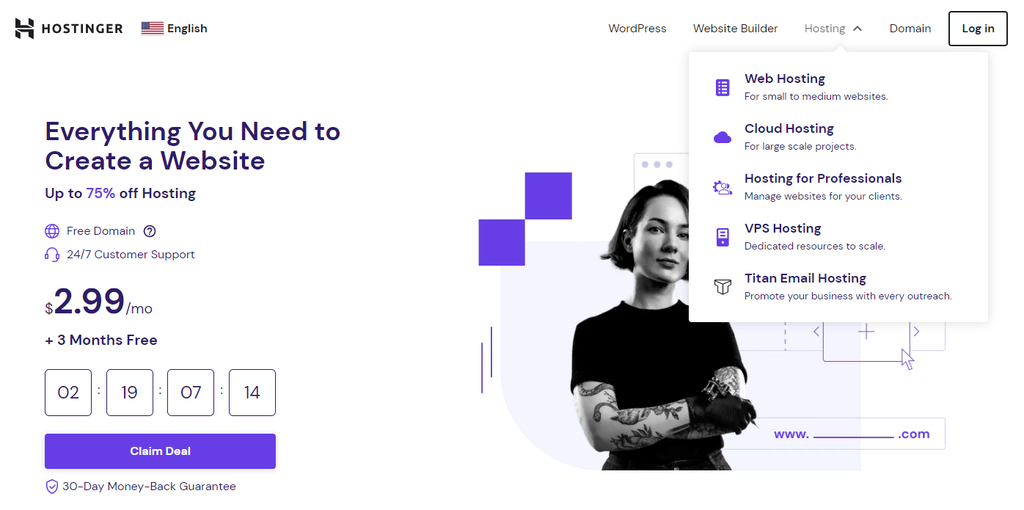
The easiest way to select the best hosting plan for your website is to understand the available options. Here are some popular hosting plans offered by most hosting providers and their pros and cons.
With a shared hosting plan, you can host multiple websites on a single server. This plan is perfect for hosting small to medium-sized websites with low traffic volumes. And it’s a cost-effective option for site testing. Also, this plan is beginner-friendly as the web host handles the running, maintenance, and other technical tasks.

The con, however, is that a lag on any of the sites hosted will affect the rest, as they all share the same physical server. Should one of the sites experience traffic spikes, it could cause other sites on the server to slow down or crash.
Cloud hosting offers more efficiency. With this plan, your website runs on multiple cloud servers, so if one server crashes, another takes over.
This hosting type works best for websites with high traffic volumes. Such websites require resource flexibility and efficiency, void of any downtime. With a cloud hosting plan, you get the ease of shared hosting and the efficiency of a VPS hosting plan.
Also, if you’re looking to scale and you need a plan that can accommodate such changes in demand, cloud hosting is your best pick. It features a dynamic server capacity that adjusts to the varying needs of your website.
However, cloud hosting is not as cost-effective as shared hosting, and its server access is not as exclusive as in VPS hosting.
VPS (Virtual Private Server) hosting creates several virtual hosting servers from one physical server, giving each server unique resources to serve a specific user. Any user on a VPS hosting plan gets root access, which affords them more flexibility and autonomy over their server settings. Hostinger even allows users to choose their preferred web server software.
The level of efficiency that VPS hosting offers is impressive, thanks to the dedicated resources. This performance makes it ideal for larger websites, like eCommerce sites, gaming servers, and blogs with high traffic volumes.
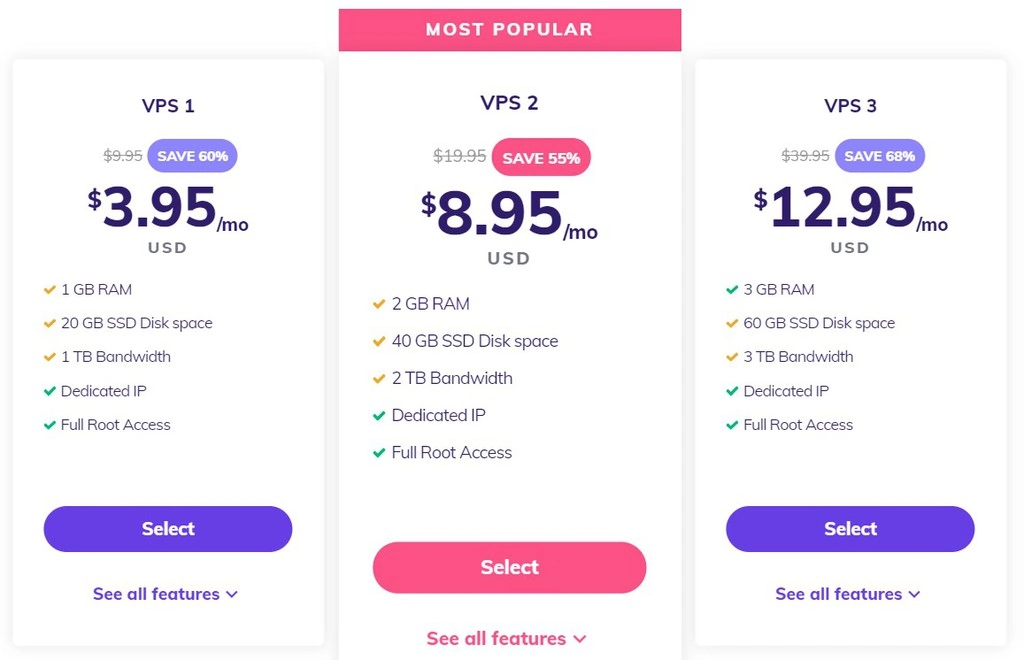
This hosting plan might not be as cost-effective as a shared hosting plan. Yet, it costs less than renting a dedicated server. So, if you want robust performance at a reasonable cost, consider VPS hosting.
However, VPS hosting requires technical know-how to utilize the resources available and maximize the server settings.
A WordPress hosting plan is the best for WordPress websites. The pre-installed plugins you get when you choose this hosting plan enable seamless technical setups and software updates. Also, your web hosting security is guaranteed.
WordPress hosting is easier when managed by the web host. The web host handles all the technical tasks while you focus on growing your WordPress website. This option is best for beginners with small to medium-sized sites. It’s like shared hosting, as you can maximize its potential with little to no technical knowledge.
Nevertheless, managed WordPress hosting costs a little more than shared hosting. Also, site owners do not enjoy the autonomy over server settings that a VPS hosting plan offers.
Step 4: Get a Domain Name for Your Site
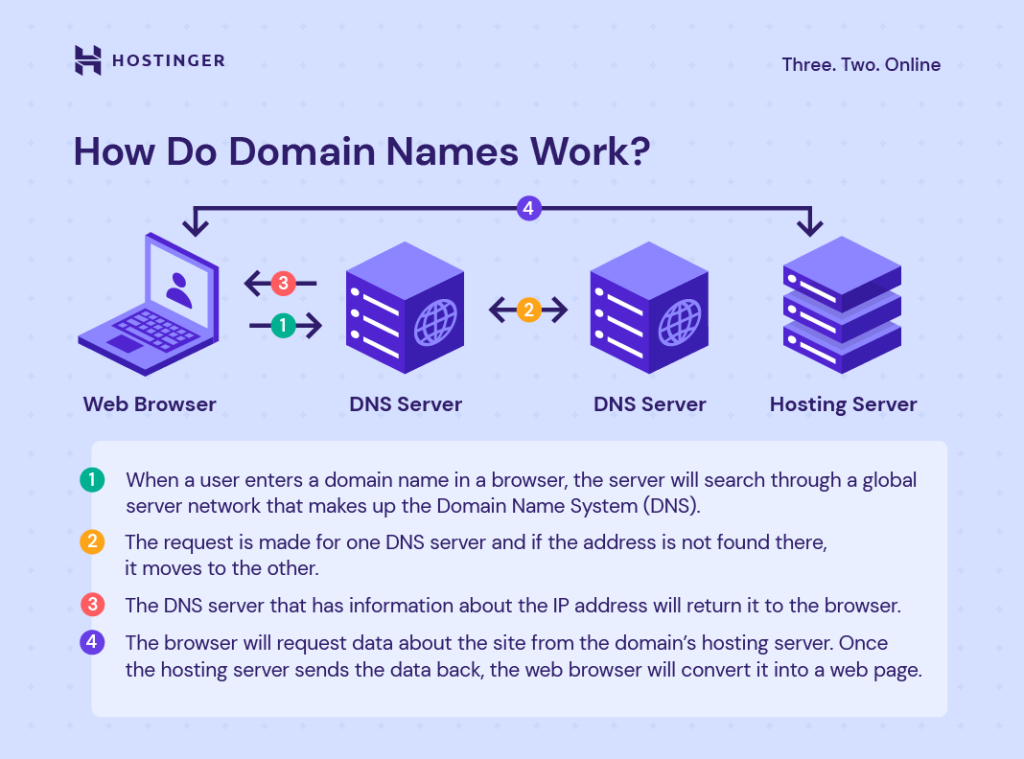
Like a physical address, a domain name is where and how visitors can find your website. This address (domain name) includes a name (second-level domain) and an extension (top-level domain).
With a domain name, a visitor doesn’t need to learn by heart your site’s internet protocol (IP) address before locating it. Most importantly, these names are key to the internet infrastructure.
Seeing as website owners can’t change their domain names after registration, making the best choice is non-negotiable. Follow the tips below to choose the right domain name:
● Include enough about your niche in your domain name. This might be in the form of popular keywords related to your brand or industry. With an online domain name generator, this process gets easier.
● Pick .com over other top level domains. Given that .com is the most popular extension, it’s often what most visitors expect your website to end with.
● As much as you can, avoid double letters, numbers, and hyphens. It increases the chances of typos and reduces the number of successful website visits.
● Strive for simplicity. Keeping your domain name short and catchy makes it memorable, and visitors can easily find your website.
● Keep it original. Having a domain name that isn’t similar or connected to another existing brand eliminates confusion. You can avoid this confusion by running a trademark search. Also, you don’t want any potential lawsuits.
After choosing your preferred domain name, it’s time to buy it. To do this, follow these 5 simple steps:
● Choose a Credible Domain Registrar
A credible domain registrar is any company licensed by the Internet Corporation for Assigned Names and Numbers (ICANN) to register and manage domain names. You must choose a credible domain registrar, as doing otherwise exposes you to risks like hidden charges and scams. Consider pricing, domain transfer policy, domain expiration and renewal policy, and other additional services when deciding.
● Conduct a Domain Name Search
Check whether your preferred domain name is available through an online domain name search. If it isn’t, select one of the domain checker’s alternatives or go for a different domain extension.
After confirming that your preferred domain name is available, it’s now time to purchase this domain. At Hostinger, purchasing your domain only takes a few clicks.
Fill in Your Contact Details
Once the purchase is complete, you’ll be redirected to hPanel to complete the process by filling in your contact details. These details will be reviewed before your registration is confirmed.
● Confirm Domain Name Ownership
After your registration is confirmed, you will get a confirmation email. This email will contain a link you must click to verify your domain ownership. Once you’ve done this, your domain name becomes active. However, failure to click the link after 15 days may lead to a temporary domain suspension.
Note: You can get a domain name and host it separately. But there’s more ease in registering through a web hosting provider that also offers domain name registration services, like Hostinger. With Hostinger, you get an accredited domain name registrar with web hosting plans that come with a free domain name upon purchase.
You can still enjoy Hostinger’s numerous web hosting benefits if you already have a registered domain name. Simply follow this link to see how to point the URL to our server. Also, you can move your domain name registration to Hostinger by using our domain transfer service and paying the required domain transfer fee.
How does web hosting work?
Web hosting is the entire process involved in publishing your website or web application on the internet. What a web hosting service offers is a rented space on a physical server for you to store all the files and data your website needs to function smoothly. Beyond this, what is web hosting, and how does it work?
Your website is hosted on a physical computer that never stops working to ensure your site is always available for visitors. With a web hosting plan, your provider offers you their servers to store all your website’s data. So, when a visitor enters your domain name into their browser, your provider’s server transfers all the files needed to load your website.
With an ideal web hosting service provider and plan, your website will get optimal performance and adequate security. Also, the right plan and provider simplify your web hosting efforts, handling every aspect from software installation to technical support.
Why You Need Web Hosting

For your website to go live, you must move your locally stored website files to a server. A web hosting service provider does this best.
For a monthly or annual subscription, you can get a web hosting service that provides servers to store your website files. This hosting provider also takes care of server-side issues, ridding you of any server maintenance worries.
Aside from the tech support, here are other web hosting benefits for your websites:
Web hosting providers offer you double benefits (hosting and maintenance) for the price of one (hosting plan fee).
● Ensuring Optimal Website Performance
In addition to providing a server, the right hosting plan offers you performance features and resources to keep your website performing optimally.
The control panel web hosting solutions provide make configuring your website effortless.
There is often a customer support team working with a reliable web hosting provider. At Hostinger, there is a Customer Success team always available to assist you via live chat.
For continuous website growth, you need a fitting and dynamic hosting plan to keep up with the growth rate and demand.
● More Time for Your Website Growth
With your chosen web hosting provider handling every technical task involved in hosting, maintaining, and securing your site, you get more time to grow your website.
The importance of every step involved in hosting your website for maximum benefits and growth confirms that doing your research is inevitable.
For every step, ensure you exhaust all researchable options before making a decision. That way, you can decide the best type of website to build, select the best hosting provider, choose the most fitting hosting plan, and get the best domain name for your site.
We have done most of the research on your behalf, and we hope this guides you through hosting your website seamlessly. Leave a comment below if you have more questions on how to host a website or why you need web hosting.